Posts

Showing posts with the label Visual Effects

VFX Challenge Day 34: Personal

Image
Here is the disintegrate effect hooked up in Liminal. This is hooked up to 10 different crab knobs (krobs), each with separate pieces having the dissolve effect applied. The legs are getting their effect from a master blueprint and each of the 10 heads are hooked up individually in another blueprint. The color of the dissolve will change dynamically based on the color of the door that the (krob) belongs to. The player sees this effect when they pick up a krob and it goes into their inventory.

VFX Challenge Day 33: Personal

Image
Continuing effects for Liminal, I have created another low poly dust cloud effect, this time for a basic cinematic. This gif loops 3 times but the final only loops once.

Visual Effect Lecture Project Week 01

This week we started on our second Tech art project, which is to create a visual effect and teach it to the class. We need to take it a step further than just a tutorial by being able to effectively explain how and why everything works and what we are doing. Since, I want to eventually create VFX for cinematic scenes I decided to demonstrate the pipeline for creating highly detailed cinematic fluids. Many programs, such as Houdini, have shelves for different types of fluids so I have decided to start with learning the background of Fluid simulation before moving onto creating my VFX. I've learned that Fluid Sims have been around since the 50s and 60 and were mathematically based and I have been trying to wrap my head around terms such as Level sets, Particle level sets,  staggered marker-and-cell (MAC) grid structures, Particle In Cell (PIC) method, which was the precursor to modern day FLIP, MPM and other hybrid methods. I am going to continue to read up on this until I fe...

VFX Challenge Day 32: UnrealCG’s Disintegration

Image
For today, I completed UnrealCG’s Disintegration effect. I only finished the material and switched out the textures and values to ones that suit my need more. I plan to hook up this iteration as a pick up effect in Liminal, so I will show that at a later date. This was my first time using Material functions and understanding what I was doing, so it was nice to see growth. https://www.youtube.com/watch?v=gldIJGqlWf0&t=105s

VFX Challenge Day 31: Alen Loeb’s Flowing Noise Material

Image
Today, I completed Alen Loeb’s Flowing Noise Material for UE4. This is continuing my explorations into noise and how it is used by different programs and what can be accomplished with it. https://www.youtube.com/watch?v=ut80qnOtNRw

VFX Challenge Day 30: Personal

Image
I have updated my laser effect to have more parameters from my design team on Liminal , with this I can change the color based on a trigger so that the player knows it has been activated.

VFX Challenge Day 29: Personal

Image
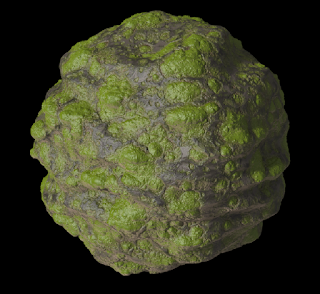
Working off of the sand and rock tutorials by Rohan Dalvi and AxisFX, I have tried to create a procedural rock creation that looks like it has algae growth on it. My noise is still very uniform but I am getting better at changing values and understanding what I am doing and where to connect things without feeling as though I am destroying my projects.

VFX Challenge Day 28: Rohan Dalvi’s Texturing and Baking 04

Image
This is the final tutorial from Rohan Dalvi before we starting baking. I still have one left to complete which involves for loops, but I am getting very comfortable with the VOP system in Houdini as I am beginning to see parallels with other node based programming, such as UE4. http://www.rohandalvi.net/home

VFX Challenge Day 27: Personal

Image
This effect is a simple iteration on the magic circle/music note effect I created a while back. I wanted to find the easiest way to make a butterfly effect without making flapping butterflies. This is the effect Liminal will use for its collectibles.

VFX Challenge Day 26: Rohan Dalvi’s Texturing and Baking 03

Image
This is the second part of the second tutorial in from Rohan Dalvi. For this, we are still using trig functions but this time we aren’t using displacement so we aren’t deforming the geometry. http://www.rohandalvi.net/home

VFX Challenge Day 25: Rohan Dalvi’s Texturing and Baking 02

Image
This is the first part of the second tutorial by Rohan Dalvi. We have started applying trig functions in order to create patterns on geometry. We then used the color ramps to apply color variation to the high and low points of the geometry. This tutorial also includes movement but I didn’t render that out. http://www.rohandalvi.net/home

VFX Challenge Day 24: Rohan Dalvi’s Texturing and Baking 01

Image
Today, in an effort to learn Houdini more firmly, I have started completing tutorials from Rohan Dalvi’s Texturing and Baking pack. So far, it has been worth the purchase as he explains things more fully than a normal tutorial and we will be going through the creation and pre-render process from start to finish. This is part one, in which we created a planet using displacement and color ramps. http://www.rohandalvi.net/home

VFX Challenge Day 23: Anastasia Opara’s Procedural Poster Shader

Image
For today, I completed Anastasia Opara’s Procedural Poster Shader tutorial for UE4. I created my own poster and rip textures for it and thanks to that I am able to see how I can easily apply this to other types of materials. I created these for the game I am working on Liminal. https://www.youtube.com/watch?v=zV4f2aNSDN8

VFX Challenge Day 22: Personal

Image
I used UE4’s destructible mesh feature for the first time to make destructible meshes for Liminal.

VFX Challenge Day 21: Anastasia Opara’s Raindrops Shader

Image
Today, I tried out Anastasia Opara’s raindrops shader tutorial for UE4. I failed at it, but I learned a lot about different ways to manipulate the material shader to do what you want it to. https://www.youtube.com/watch?v=ymAuk1z6f-g&t=2s

VFX Challenge Day 20: Personal

Image
Working from the Breath of the Wild tutorial from earlier, I created a target effect for Liminal.

Pacific Tidepools Week 01: Inspiration

Image
This semester we are creating a gallery piece in our common art class. We have the freedom to create a new piece or update an old one and I have chosen to create a new VFX piece in Houdini. I went to Portland in March and we drove down to San Francisco. One stop in particular was really beautiful so I am going to completely recreate the scene in Houdini. Here are just a few of the videos am picture I am referencing:

VFX Challenge Day 19: Medel Design’s Firefly Particles

Image
Today, I followed Medel Design’s Firefly Particle system tutorial to create some bioluminescent flies by tweaking the value to my liking. https://www.youtube.com/watch?v=lJRiJknR4zY

VFX Challenge Day 18: UE4 Forum

Image
I created a flickering material based on what I have found on this UE4 forum. One change I made, was to put the same color for the emissive into the based color so that instead of flickering to black it flickers to an unlit-looking version of the emissive. https://answers.unrealengine.com/questions/154126/flashing-blinking-material.html

VFX Challenge Day 17: Personal

Image
Working off the smoke effects I have created previously, I completed a small candle fire effect for Liminal.